OSM-IMX93
Enablement
LAVA by default is configured to work with this DUT + LAA setup. If you opt for a different setup you’ll have to change your DUT + LAA device configuration on LAVA.
For our OSM-IMX93 setup we make use of the I-Pi OSM-IMX93, which can be automated using the Flylead boards MIB.
Components
The following components are required to fully automate the board:
Short RJ45 network cable
USB-A male to MicroUSB male cable
USB-A male to USB-C male cable
Micro SD Card
2.5/5.5mm barrel jack to MIB 2-pin connector, wired center positive
4x jumper wires
Hardware modification
In order to automate recovery, the DUT hardware should be modified.
Hardware modification
The DUT will not be automatizable without this modification.
Boot Select switches
A 2x jumper wires cable has to be soldered around SW7 and connected on the
Flylead to V Button 1.
Another 2x jumper wires cable has to be soldered around SW8 and connected on
the Flylead to V Button 2.
The polarity for both jumper wires cables doesn’t matter.
This will be used to short circuit the ends of the switches and change the boot
mode as we want.
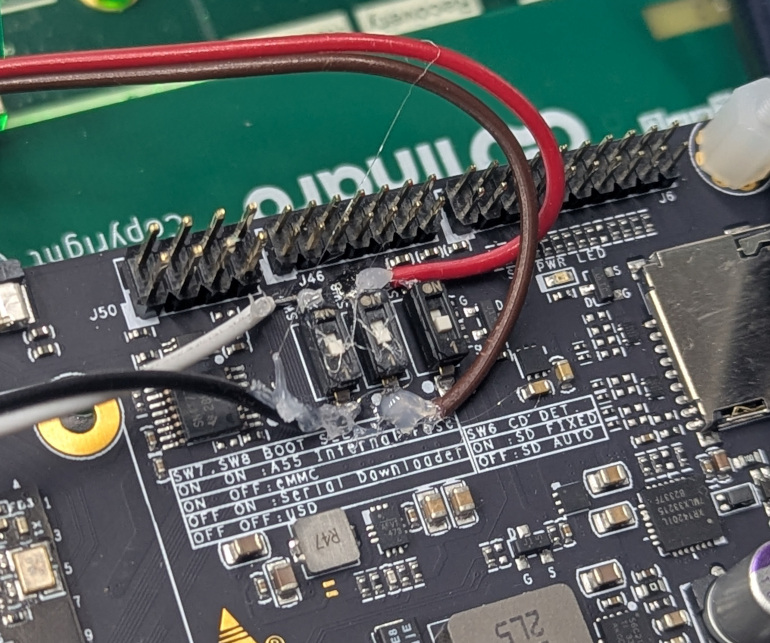
HW modification
MIB
The following picture shows how to connect the OSM board to the MIB.
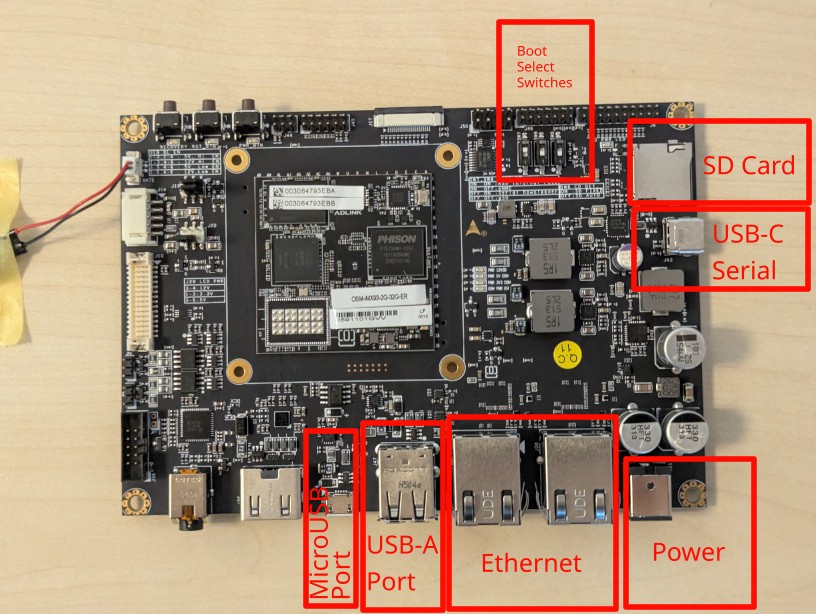
I-Pi OSM-IMX93
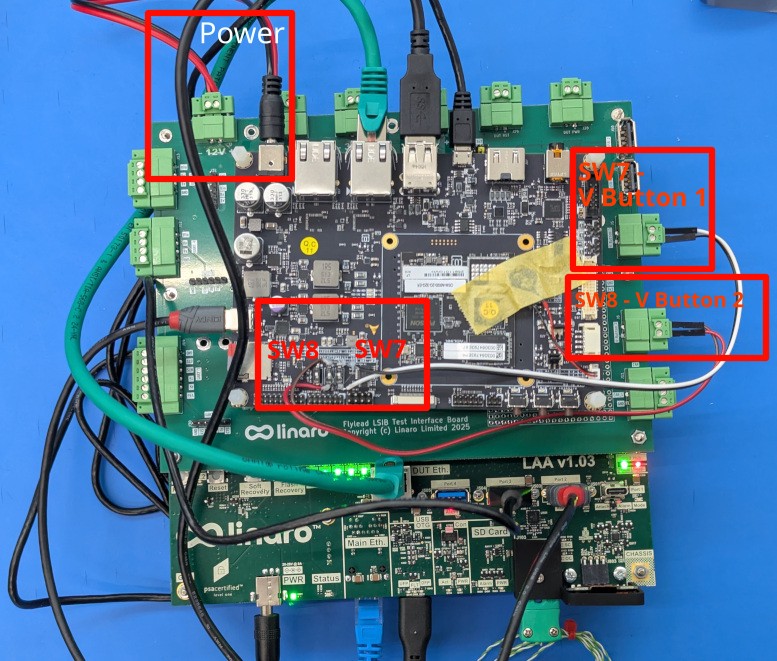
LAA Connections
Recovery
Connect the recovery SW7 wires cable to the Flylead MIB header labeled
V Button 1.
Connect the recovery SW8 wires cable to the Flylead MIB header labeled
V Button 2.
Network
Connect the OSM-IMX93 network interface to the LAA private network interface as indicated above.
Power
The OSM-IMX93 gets power from the 2.5/5.5mm barrel jack connected to the board
and the 12V header on the MIB.
Serial
Connect a USB cable from the carrier board USB-C port to USB Port 3 on the LAA
as shown above.
Flashing
Connect a cable from the USB-A LAA USB Port 2 (facing upward) to the OSM-IMX93
MicroUSB Port shown in the picture above.
USB
Connect the LAA USB OTGport (front facing) to the OSM-IMX93 USB-A Port shown
in the picture above.
SD Card
At least, use and format a 16 GB SD card. Insert it in the SD card slot on the OSM-IMX93 board.