LAA Overview
The LAA is a fully integrated Embedded Device testing appliance.
The LAA allows you to quickly integrate a new Device Under Test (DUT) into any test automation framework, like LAVA or Labgrid, by providing all the necessary hardware components to automatically test your software (from the firmware to user space applications) on your hardware.
The same appliance is equally useful outside a CI pipeline, to drive a board interactively from your laptop, or to hand controlled access to your hardware to someone outside your team. The three ways it’s used are described in the Use cases section.
The LAA is a core component of Linaro’s virtual lab technologies.
The LAA is consist of three components:
a Standard Interface Board (SIB) (the light blue case here)
a Mechanical Interface Board (MIB) (the green PCB here)
a Device Under Test (DUT) (a Renesas board here)
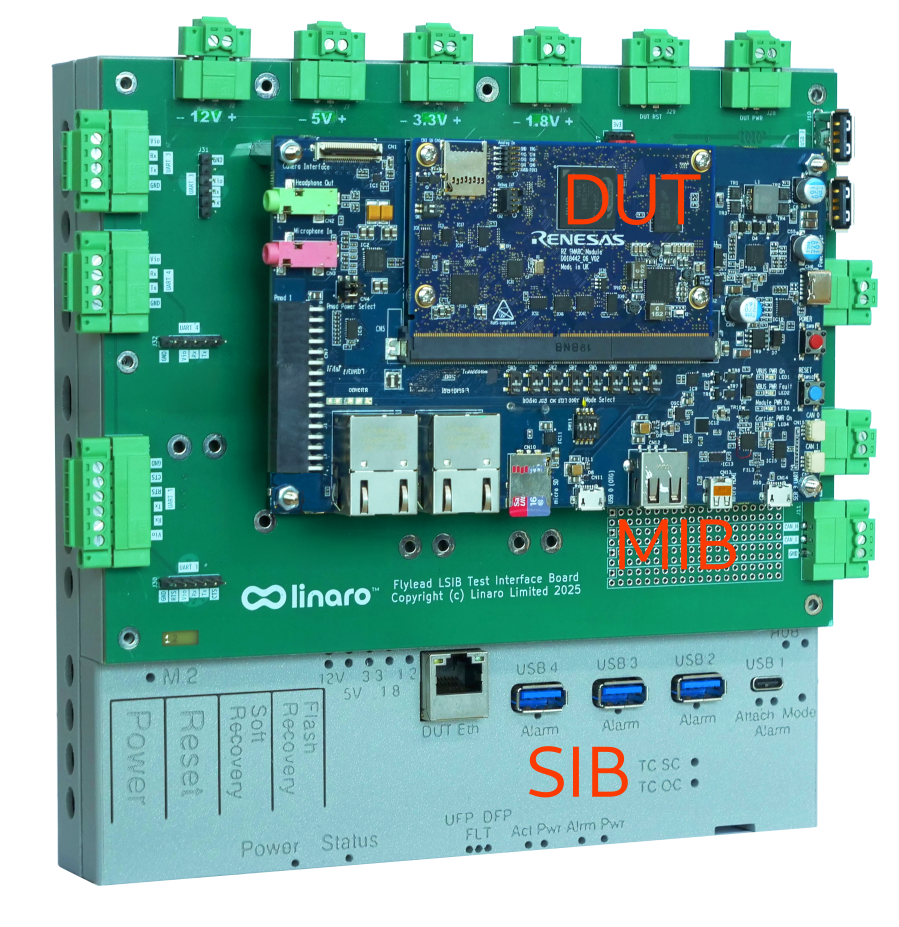
A Device Under Test (DUT) is coupled to the LAA via the MIB. The list of supported devices and how to connect them to the LAA can be found in the Devices Overview section.
Standard Interface Board
The SIB is the compute engine of the LAA, facilitating communication with the cloud-based fleet management service via HTTPS. It controls the DUT, manages device registration, supports device access control, enables OTA updates, and performs various other critical functions.
It’s also where the test runtime runs—a LAVA worker, a GitLab runner or a KernelCI runner, selected remotely—as well as the REST API used to drive the DUT interactively or from a script.
The SIB features a standard interface connector that supports the connection of various MIBs. The SIB includes all necessary hardware components to fully automate testing on the DUT and allows a user to remotely test software on a local DUT via the MIB.
The SIB is providing all the necessary hardware components to automate tests on the DUT:
Status Indicators (OLED Panel / LED’s)
OLED: IPv4, hostname, serial, version
LEDs: Pwr, USB, Eth, DUT, NVME status, other
Two Ethernet ports (RJ45)
A private one for DUT connection to isolate the test network
A public one for Cloud Connection to the LAVA Managed Server and test package downloads if required
Managed power rails: 1v8, 3v3, 5v and 12v
A managed USB hub:
1 type-C PD (power delivery) and 3 type-A
A USB OTG port that can be leveraged for USB mass-storage emulation
Virtual buttons
Thermal probe support for measuring DUT temperature
A standardized 96-pin Connector to support customizable MIB’s - Multi-use Expansion GPIO Pins (I2C, Uart/Console, SPIO)
DUT Power monitoring support
Mechanical Interface Board
The MIB is a separate board that provides basic PCB mapping between the SIB and the DUT.
This helps to solve the problem that no two embedded platforms are alike, and hand wiring has been found to be unreliable, historically causing many hardware faults in labs post-installation due to rack vibrations, slight board movements, etc.
The stability provided in a setup using mechanical connectors such as on MIBs greatly improves lab installation long-term reliability and sustainability.
MIBs can also be customized to include active circuitry for use cases requiring voltage stepping, external regulators for automation control, and SIB expansion GPIO for component control.
The current list of available MIBs can be found in the MIBs section of this document.
Custom MIB
For specific boards, it’s easy and economical to create a custom MIB in the cases where you may need to support multiple DUTs of the same family using the LAA.
Where to go next
Set the appliance up—Quick start to unbox it and attach your DUT, then Connectivity to put it on your network.
Pick your use case—Use cases covers developing on a DUT, hardware in the CI loop and sharing a DUT.
Understand the design—Design goals explains the lab problems the LAA is built to solve, and why each appliance drives a single DUT.