FRDM-IMX91
Enablement
LAVA by default is configured to work with this DUT + LAA setup. If you opt for a different setup you’ll have to change your DUT + LAA device configuration on LAVA.
The FRDM-IMX91 is powered over USB-C and exposes its console on an on-board dual USB-serial bridge, so power and console both run over USB and no MIB signals are needed. DUT can be automated using the No-MIB.
This document applies to the following boards:
FRDM-IMX91: imx91-11x11-frdm
Components
The following components are required to automate the board:
Short RJ45 network cable
USB-C male to USB-C male cable
USB-A male to USB-C male cable
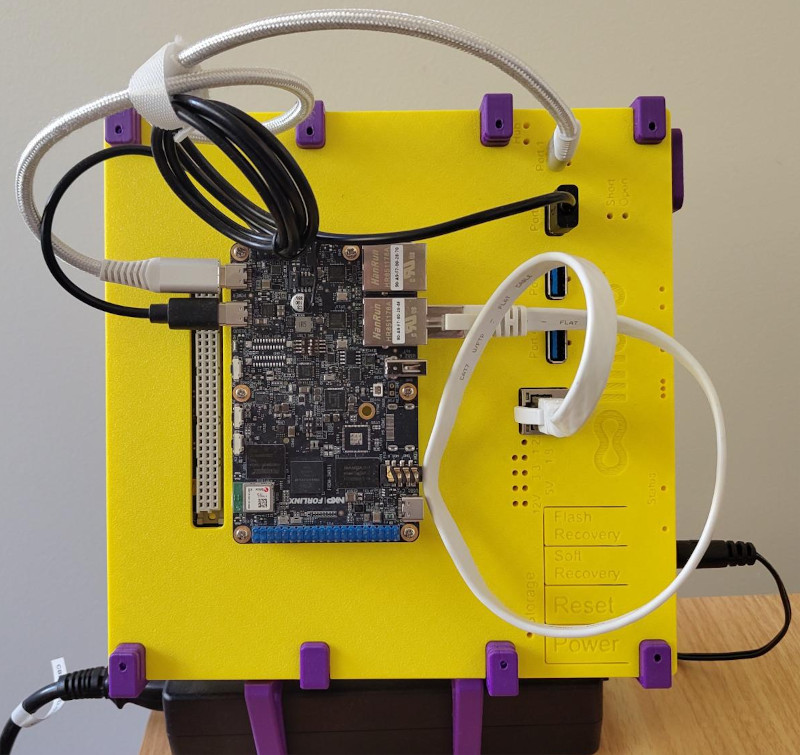
Hardware modification
None.
Recovery isn’t automated
Entering the serial downloader mode requires changing the SW1 boot mode
switches by hand, so recovery and eMMC reflashing can’t be driven automatically.
If automated recovery is needed, solder flying leads across the
SW1 switches and drive them from the Flylead MIB
virtual buttons, as done for the OSM-IMX93.
Boot mode switches
Set SW1[4:1] to 0010 to boot from the on-board eMMC. This is the factory
default.
Connections
Power
Connect a USB C-to-C cable from the LAA USB port
1 (facing upward) to the FRDM-IMX91 P1
USB-C connector. Port 1 is the type-C port with power delivery, and the board
negotiates a USB-PD contract on it.
laam laacli usb 1 on
laam laacli usb 1 off
Serial
Connect a USB A-to-C cable from the LAA USB port
2 (facing upward) to the FRDM-IMX91 P16
USB-C debug connector.
The Cortex-A55 console is accessible at /dev/ttyACM0, served by
ser2net on port
2020 at 115200 8N1:
laam laacli usb 2 on
laam serials connect ttyACM0
Leave the console powered
Keep USB port 2 turned on permanently. It only feeds the debug bridge, and leaving it on keeps the console attached across DUT power cycles.
Network
Connect one of the two on-board RJ45 sockets to the LAA private network interface.